Faded Photo Restoration
Washed-out contrast, yellowed highlights and colours that drifted over the decades can be lifted back with AI restoration. Upload the print and have a clearer version in minutes.
Why photographs fade
Prints do not fade because of age alone. Light is the main cause: ultraviolet rays slowly break down the dyes and silver in a print, which is why a photo that hung on a sunny wall looks paler than one kept in an album. Heat and humidity speed this up. Colour prints from the 1960s to the 1990s are especially prone to it, because their cyan, magenta and yellow dyes fade at different rates. The result is the familiar orange or pink cast with weak shadows. Black-and-white prints tend to lose contrast and turn yellow or brown at the edges.
What can be recovered, and what cannot
Fading lowers contrast, but it rarely erases the picture completely. Most of the image is still there, just compressed into a narrow range of pale tones. Restoration stretches that range, corrects the colour cast and sharpens soft detail.
- Usually recoverable: washed-out contrast, a yellow or orange cast, weak shadows, dull skin tones, mild softness.
- Partly recoverable: areas that have faded almost to white. The AI has to estimate what was there, so the result may look plausible rather than exact.
- Check closely: badly faded, very dark or very low-contrast pictures, especially old tintypes. With so little tonal information to work from, a face can come back looking different from the real person.
- Not recoverable: detail that was never captured, such as a face that was blurred or tiny in the original.
In our own tests the model is very good at the damage that usually travels with fading: spots, cracks, scratches and dust across clothing and backgrounds, plus lifting flat contrast and removing a colour cast. Where it is weaker is faces in badly faded or dark originals, which can come back altered, so put the result beside your original and look at every face. If one is off, use a free redo, and the 30-day guarantee covers the rest.
How to photograph or scan a faded print
- Use a flat scan at 600 dpi if you have a scanner. For small prints, scan at a higher setting.
- With a phone, lay the print on a table by a window in daylight. Avoid flash and avoid overhead bulbs, which add glare and a colour tint.
- Hold the phone parallel to the print so the edges are square, and fill the frame.
- Do not boost the contrast yourself. Upload the dull version, because the restoration works from the original tones.
What you receive
You pay once per photo, with no subscription. Essential gives you the restored photo at full size with 2 free redos. Complete adds a colourised version and 5 free redos. Prices start from $24 / £19 per photo, with savings of 15% for 3 or more photos, 25% for 5 or more and 35% for 10. Full-size files print well to about 8x10 inches.
Preparing a print? See our guides on photographing an old photo with your phone and storing prints so they stop fading, the FAQ for common questions, and DIY, AI or professional restoration if you are weighing options.
Your photo is deleted after 45 days and is never used to train AI. Checkout is secure and handled by Stripe.
Example: a flat, yellowed tintype
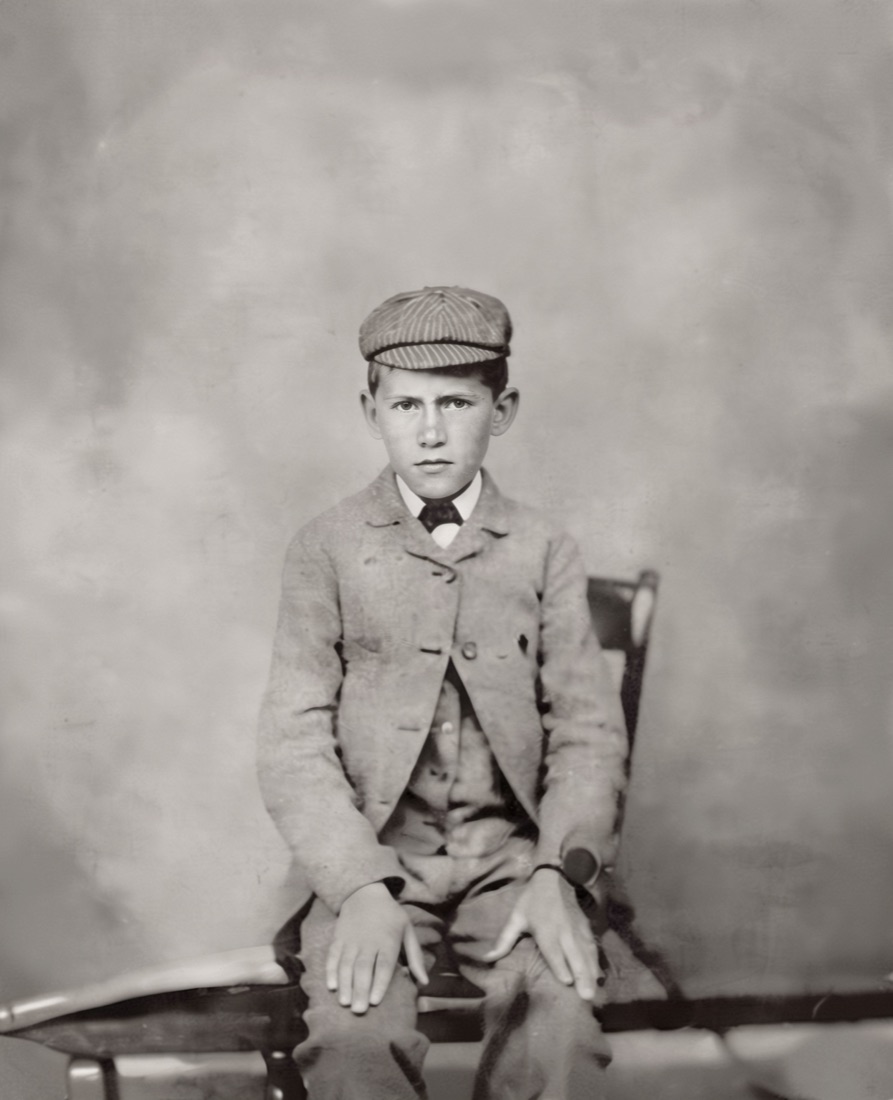
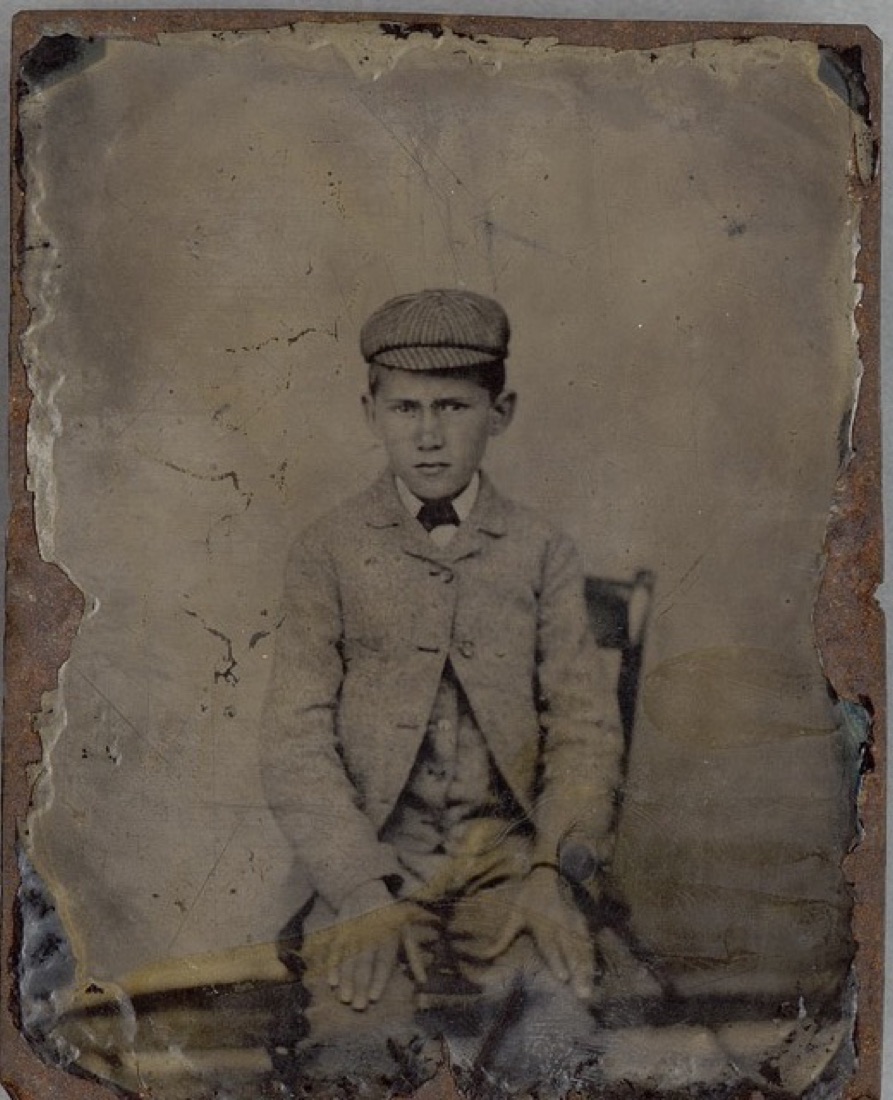
Tintype portrait of a boy: flat, yellowed tones, cracks and chipped edges. Very dark or faded tintypes like this can come back with altered faces, so compare the face with your original. Drag the line to compare. A real result from our service; yours may turn out differently.
Questions about faded photos
Can a badly faded photo really be restored?
Usually a good deal can be recovered, as long as some image information is still in the print. If an area has faded to pure white, the detail there is gone and the AI has to estimate it. Very faded or dark originals, tintypes in particular, can come back with altered faces, so check every face against your original and use a redo if one looks wrong.
Will the faded colours come back?
The restored photo lifts contrast and brings back tone. Colours that have shifted to orange or magenta are improved, but they may not match the original dyes exactly. The Complete option also adds a colourised version.
How long does it take?
Your result is ready in minutes after payment.
Can a very dark or faded tintype be restored?
Often the damage (cracks, scratches, flaking edges) is repaired well and tone is much improved. The risk is the face: in a dark, low-contrast tintype the model may alter features. Compare closely. Redos are included and the 30-day money-back guarantee applies.
What if I do not like the result?
Essential includes 2 free redos and Complete includes 5. If you are still not happy, our 30-day money-back guarantee applies.